KeySend

Know which Google Ads clients need attention

For Google Ads consultants and freelancers

Have the explanation ready before they ask. KeySend checks each client's Ad Account every day, writes a weekly assessment with the numbers behind each point, and gives you a branded PDF report to send.

Start my free 14-day Trial

View a sample report · PDF of a fictional account

No payment card. KeySend only reads Google Ads. You make every change yourself.

Then $49 per month, plus applicable tax, for up to 5 Ad Accounts. You choose whether to subscribe.

Google's Ads permission includes reading and editing. KeySend uses it to read data and does not send edit requests. You can remove access in your Google account. Privacy Security

Today's Update Monday 12 October

Spend was steady this week at $3,738, and conversions rose from 95 to 102. Most of the gain came from Search - Emergency after its bid strategy changed on 4 October. Display - Remarketing is the one to watch.

An Update always compares the last 7 days with the 7 days before.

  • Search - Emergency: 57 conversions, up from 47, at $37.20 each.
  • Display - Remarketing: conversions fell from 9 to 4 after the daily budget went from $45 to $20 on 8 October. The count is small, so this can be chance.
Example. Fictional Harbour Dental data.

KeySend is a Google Ads monitoring and reporting service for consultants. It reads each client's Ad Account every day, tells you which ones need attention and why, and writes the weekly assessment and the PDF report that you send to the client.

Start in three steps

  1. Sign in with Google.
  2. Allow KeySend to read Google Ads, and choose your clients' Ad Accounts. Client accounts under a manager account work too.
  3. Read the first Update for each client when it is ready.

You need no payment card, and you can remove the Google permission at any time.

Not a consultant? For business owners An agency runs my ads I am a marketing manager

Five clients. Which one needs you today?

Any client's account can change on any day. Usually you find out at the monthly report, or when the client calls.

  • A client's Campaign stops on Tuesday. The client notices first.

    A declined card, a disapproved ad or a paused Campaign. Their phone goes quiet, and you are the one who has to explain it.

  • Wasted searches pile up between your checks.

    Someone looking for a job clicks a dental ad. It happens again tomorrow, in an account you open once a week.

  • The client asks why cost per lead went up.

    You compare date ranges and dig through the change history to find what moved, while the client waits for an answer.

  • Reporting eats the hours you could bill.

    Every month each client needs the numbers and a few paragraphs that explain them. Writing them by hand takes hours that nobody pays for.

KeySend watches every client's account each day and writes the explanation, so you start from the answer.

Every morning, where things stand

A short Update for each client's Ad Account: spend, conversions and Campaign movements, the account change that probably explains them, and the evidence behind it.

Every client's account, every day
Daily Updates cover performance. Search terms, keywords, ads and landing pages receive a weekly Deep check.
See the evidence behind a change
When a budget or a bid strategy changed, the Update names the day and what moved after it.
You do not chase noise
When a number is too small to trust, the Update says that the change can be chance.
A quiet day is one sentence
“Nothing notable changed in the last 7 days.” You read it and go on with your day.

The four numbers a client asks about first

What was spent, what it brought, what each result cost, and how that compares with the week before. Then the charts behind them, each with its main point written above it.

Last 7 days

5 to 11 October, compared with the 7 days before.

What this shows and what you can do

Spend is the money that Google Ads charged for the ads in these days.

A conversion is a result that you count in Google Ads, for example a call, a form or a sale.

Cost per conversion is the spend divided by the conversions. A lower cost per conversion means each result cost less.

A click is one click on an ad. One person can click more than once.

What you can do

  • Read the change under each number first. It compares these days with the same number of days before.
  • Choose a number to see it per day in the chart below.

Data limitation: A conversion can arrive some days after the click. The numbers of the newest days can still go up.

Spend
$3,738
down 1.7% from $3,801
Spend per day from 5 Oct to 11 Oct: $366 at the lowest, $639 at the highest.
Conversions
102
up 7.4% from 95
Conversions per day from 5 Oct to 11 Oct: 9 at the lowest, 18 at the highest.
Cost per conversion
$36.64
down 8.4% from $40.02
Cost per conversion per day from 5 Oct to 11 Oct: $33.90 at the lowest, $40.85 at the highest.
Clicks
2,023
down 5.9% from 2,150
Clicks per day from 5 Oct to 11 Oct: 190 at the lowest, 359 at the highest.

Spend per day, against its usual range

Spend had no unusual day in the last 7 days.

Skip the chart
$300$550$8008 Oct5 Oct11 Oct
  • Spend
  • Usual range for the weekday
  • Unusual day
  • Account change
Spend per day, 5 Oct to 11 Oct
DaySpendUsual rangeAccount change
Mon 5 Oct$639$626 to $649
Tue 6 Oct$580$581 to $605
Wed 7 Oct$579$514 to $767
Thu 8 Oct$587$579 to $600Display - Remarketing: Daily budget changed from $45.00 to $20.00
Fri 9 Oct$576$578 to $600
Sat 10 Oct$409$417 to $435
Sun 11 Oct$366$371 to $384
What this shows and what you can do

The line is the value of each day.

The band shows one standard deviation above and below the weekday average, using up to 8 earlier matching weekdays and requiring at least 4. It describes past variation, not a forecast or confidence interval.

A red point marks a larger deviation beyond the alert threshold. Crossing the shaded band alone does not trigger it. A dotted line marks a change in the Ad Account.

What you can do

  • Look at an unusual day first, and read the Update of that day.
  • When an Account change is near an unusual day, check that change in Google Ads. The chart shows when things happened. It does not show the cause.

Data limitation: Google Ads can correct the numbers of the newest days.

Spend and conversions by Campaign, last 7 days

Search - Implants takes 23% of spend and brings 11% of conversions.

Skip the chart
Search - Emergency57%56%
Search - Implants23%11%
Search - Brand15%29%
Display - Remarketing5%4%
  • Share of spend
  • Share of conversions
Spend and conversions by Campaign, last 7 days
CampaignSpendShare of spendConversionsShare of conversions
Search - Emergency$2,12157%5756%
Search - Implants$87123%1111%
Search - Brand$57015%3029%
Display - Remarketing$1765%44%
What this shows and what you can do

This chart shows where the budget goes.

Each Campaign has two bars: its share of the spend and its share of the conversions. When the two bars have the same length, the Campaign brings conversions in proportion to its spend.

What you can do

  • Look for a long spend bar next to a short bar of conversions. That is where spend brings the least.
  • Open that Campaign and read its Recommendations before you change its budget. A Campaign can have a different goal, for example to make the brand known.

Data limitation: Each conversion counts the same here. The chart does not know the value of a conversion.

Example. Fictional Harbour Dental data.

See where your ads could appear more often

Google Ads estimates the share of eligible Search impressions lost to budget or Ad Rank. KeySend shows these estimates by Campaign, so you can decide whether to review the budget, bids, ads or landing pages.

Search impression share, last 7 days

Search - Emergency lost 31% of its estimated eligible Search impressions to budget. That is the largest loss in this chart.

Skip the chart
Search - Emergency52%31%17%
Search - Implants64%6%30%
Search - Brand91%7%
  • Impression share
  • Lost to budget
  • Lost to ad rank
Search impression share, last 7 days
CampaignImpression shareLost to budgetLost to ad rankDays with an exact share
Search - Emergency52%31%17%7 of 7
Search - Implants64%6%30%7 of 7
Search - Brand91%2%7%7 of 7
What this shows and what you can do

Google Ads estimates how many impressions the ads were eligible to get on the Search Network. The estimate uses targeting, approval, bids and quality.

Impression share is the part of those eligible impressions that the ads got.

Lost to budget is the part that the ads did not get because the budget was too low.

Lost to ad rank is the part that the ads did not get because their Ad Rank was too low. Ad Rank depends on the bid, the ad quality, the Ad Rank thresholds and the context of each search.

What you can do

  • For impressions lost to budget: before you increase the budget, check that the Campaign brings results at a cost that you accept.
  • You can also remove spend from search terms and keywords that bring no results. The same budget can then cover more of the other eligible impressions.
  • For impressions lost to ad rank: look at the bids and at the Quality score of the keywords on the page of the Campaign.

Data limitation: These shares are estimates by Google Ads. Google Ads gives no exact value when the impression share is under 10% or a loss is over 90%. The chart leaves those days out and states how many days it uses.

Example. Fictional Harbour Dental data.

Recommendations you can defend in front of a client

Each Recommendation names the problem, the change to make, how sure KeySend is, and how to check that it worked, with numbers you can find in Google Ads.

KeySend never changes the account. You decide, and you make each change yourself in Google Ads.

  1. Finding
    Search - Emergency is limited by its budget
    Impact
    Google estimates that the budget limits this Campaign's eligible Search impressions. Review its cost per conversion before testing a higher daily budget.
    Suggested action
    Increase the daily budget of Search - Emergency.
    Evidence
    Search - Emergency lost an estimated 31% of its eligible Search impressions to budget. Its cost per conversion is $42.62, with 214 conversions.

    Confidence: medium

  2. Finding
    A landing page of Search - Emergency has a high cost
    Impact
    The home page needs 28 clicks for one conversion. The emergency page needs 13.
    Suggested action
    Send the ads in Search - Emergency to the emergency page, not to the home page.
    Evidence
    https://harbourdental.example/: $3,380 spend, 1,300 clicks, 47 conversions. The emergency page gets 158 conversions from 2,004 clicks.

    Confidence: medium

  3. Finding
    Wasted search term
    Impact
    People who look for a job are not patients. This search term spends without conversions.
    Suggested action
    Add dental implants jobs as a negative keyword in Search - Implants.
    Evidence
    dental implants jobs: $186 spend, 74 clicks, 0 conversions in the last 30 days.

    Confidence: medium

Example. Fictional Harbour Dental data.

A weekly assessment of each client's account

Once a week, the Deep check goes through search terms, keywords, landing pages and ads. It writes an assessment: what worked, what needs attention and what to do next, each point with the numbers it rests on. When a change can be chance, it says so.

Search terms with the most spend

1 of the 5 search terms with the most spend has spend and no conversions: $296.

  • emergency dentist near me
    Spend
    $2,612
    Clicks
    1,004
    Conversions
    71
  • tooth pain dentist today
    Spend
    $1,344
    Clicks
    517
    Conversions
    33
  • emergency dentist
    Spend
    $1,180
    Clicks
    454
    Conversions
    29
  • dentist open saturday
    Spend
    $641
    Clicks
    247
    Conversions
    15
  • free dental care
    Spend
    $296
    Clicks
    121
    Conversions
    0Spend, no conversions
What this shows

A search term is what a person typed in Google before your ad appeared. It can be different from your keyword.

Google Ads measured these numbers in the 30 days before the Deep check.

A search term with spend and no conversions shows where budget went without a recorded result.

What you can do
  • A term that does not fit your business: add it as a negative keyword in Google Ads. Your ads do not appear for a negative keyword.
  • A term that fits your business and has conversions: add it as a keyword. You can then write an ad for it.
  • A term that fits your business and has no conversions: read the ad and the landing page that it leads to before you exclude it.

Data limitation: Google Ads does not report every search term: it leaves out terms that few people searched for. A conversion can arrive some days after the click.

Example. Fictional Harbour Dental data.

Hear about a problem before the client does

Alerts cover selected problems. Campaign stops and qualifying spend increases can trigger an email the next morning. Zero-conversion Alerts allow two days for delayed data. A Weekly email brings the overview together.

Example. Fictional Harbour Dental data.

Alerts for selected problems

Alerts cover selected problems. Campaign stops and qualifying spend increases can trigger an email the next morning. Zero-conversion Alerts allow two days for delayed data.

KeySend AlertHarbour Dental: Search - Emergency stopped serving on 12 October.

A Weekly email each Monday

One email with every client's Ad Account: what was spent, what it brought, and how that compares with the 7 days before. You choose which Ad Accounts are in it.

KeySend Weekly emailYour week in Google Ads: Harbour Dental

A client-ready PDF report

Export a client's Ad Account or one Campaign as a PDF, with the assessment, the numbers and charts of the last 7 or 30 days, and the Recommendations. Add your name, your logo and your accent colour, and send it as it is.

You download the Export. KeySend never sends it to anyone.

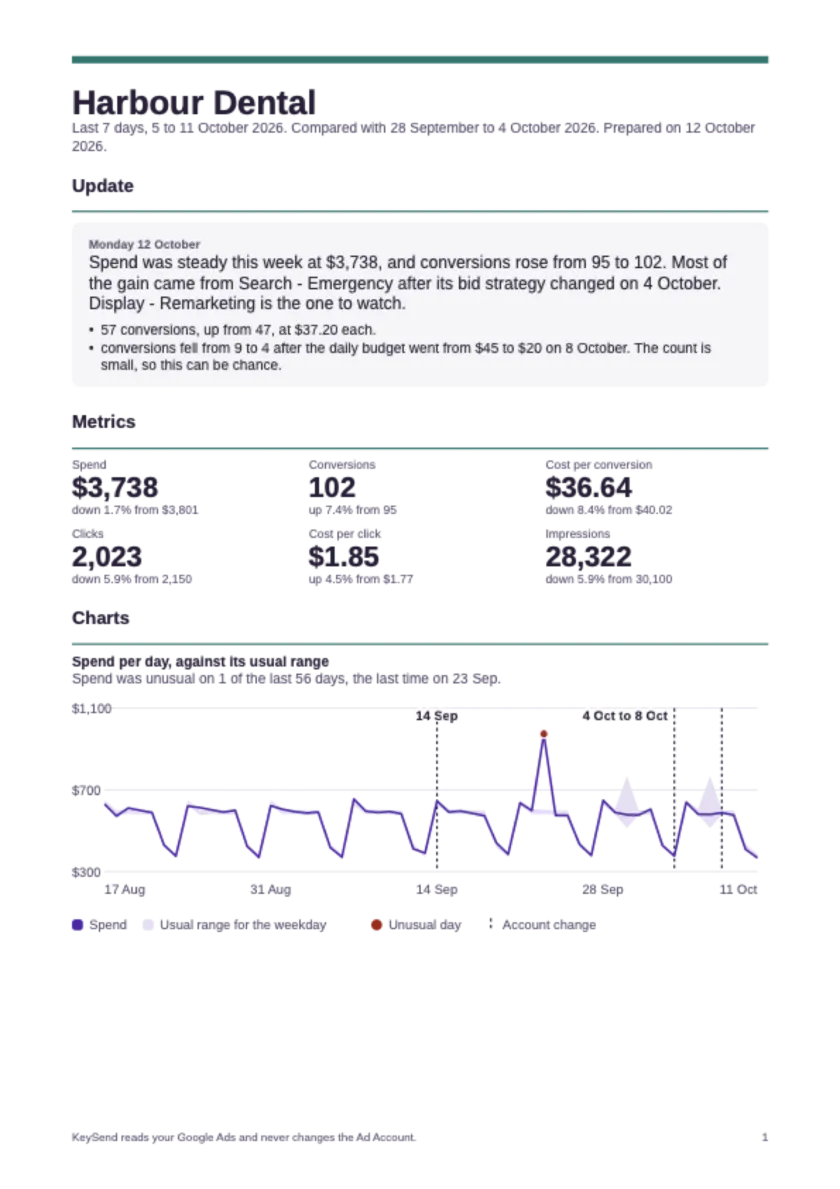
Example PDF Export with fictional data. Your Export uses the selected Ad Account and the last 7 or 30 days.

View a sample report · PDF of a fictional account

First page of a PDF Export for Harbour Dental, with the numbers of the last 7 days and the Update.

Why I built KeySend

Paul Bădărău, founder

Hi, I'm Paul.

Running one Google Ads account is manageable. Watching five, and explaining each of them to a client, is a different job.

Checking every account each week and writing up what changed each month takes hours that nobody pays for.

KeySend checks every account daily, runs a weekly Deep check and writes the assessment with the evidence behind each point. The price does not depend on ad spend.

KeySend is open source. You can read the code to see how it reads Google Ads data and builds its reports. Source code on GitHub

Try it for 14 days. If your first Update isn't clear, write to me at [email protected].

We read your Google Ads data. We do not change the Ad Account.

KeySend sends read requests, not edit requests. You can remove its Google permission at any time.

Security

We do not sell your data. We do not use it for advertising or to train AI models. Read the Privacy page

What KeySend cannot do

  • KeySend does not edit your Ad Account. You make changes yourself in Google Ads.
  • It cannot judge results if Conversion tracking is not set up. It then reports spend and clicks, and says so.
  • It cannot be sure about small numbers. When a change can be chance, the Update says so.

One plan. Everything included.

The price does not depend on ad spend. We do not earn more when your clients spend more.

Trial
14 days
Everything is included. No payment card.
View a sample report · PDF of a fictional account
Subscription
$49
per month, plus applicable tax, for up to 5 Ad Accounts.
  • Up to 5 Ad Accounts, usually one per client
  • Daily monitoring and Alerts
  • A weekly assessment with Recommendations
  • Client-ready PDF reports with your branding
  • Comparisons with earlier weeks and the same weeks last year
  • Context from each client's own website
Need more than 5 Ad Accounts? Email us at [email protected].
Start my free 14-day Trial

Cancel renewal at any time. Access continues until the paid period ends. For a full refund of your first payment, email us within 30 days. Read the Terms Security · [email protected]

Questions

Can KeySend change my ads or my budget?

No. KeySend only reads the Ad Account. When a Recommendation says to change something, you make the change yourself in Google Ads.

What counts as an Ad Account?

One Google Ads account that you connect, usually one client. A manager account does not count. You choose the client accounts under it.

Can my clients read the reports without knowing Google Ads?

Yes. Updates and Exports are written in plain language and explain words such as conversion and Quality score. Exports are in English or Romanian.

How long does it take to start?

Sign in with the Google login that has access to your clients' Ad Accounts, connect Google Ads and choose the Ad Accounts. KeySend then prepares the first Update for each.

What if Conversion tracking is not set up?

KeySend then cannot judge results. It reports spend and clicks, and it tells you that Conversion tracking is missing.

Google says that KeySend can edit my Ad Account. Is that true?

Google words this permission broadly for every app, and it covers reading and editing. KeySend only sends read requests today. You can remove the permission at any time in your Google account.

How is this different from the advisor inside Google Ads?

Google's advisor answers when you are inside Google Ads and ask it a question. KeySend looks at your Ad Account every day without being asked and writes to you, so you do not need to know what to ask. KeySend does not earn from your ad spend. The price is the same if you spend more or less.

Does it work with Meta or other ad platforms?

No. KeySend reads Google Ads only.

How do I send reports to clients?

Download a client's Export as a PDF with your name, logo and accent colour, and send it yourself. One Subscription covers up to 5 Ad Accounts. Clients have no login.

What happens when the Trial ends?

KeySend stops writing Updates. We have no payment card from you, and we charge nothing. Your earlier Updates stay, and the daily Updates continue the day after you start the Subscription.

Know which clients need you. Have the answer ready.

Start my free 14-day Trial

No payment card. KeySend only reads Google Ads. You make every change yourself.